 Guides
Only show guides for your app
GuidesWhich edition your Falix Minecraft server runs, who can join it, and how the panel gets Bedrock players onto a Java server.
A Falix Minecraft server runs one of the game's two editions, and the server software you install decides which. Java Edition is Minecraft on computers, and Bedrock Edition is Minecraft on phones, tablets, consoles and Windows. A player on one edition can't join a server made for the other unless the server translates for them, which the panel can set up.
This page follows Mia, who plays on a laptop and runs a Java server at mia.falixsrv.me, and her friend Leo, who plays on his phone.
The quickest check is Connect on the Console page, which has a tab for each edition. On a Java server without cross-play, the Bedrock Edition tab opens with "Your server doesn't support Bedrock Edition." On a server from the Bedrock Edition group, the Java Edition tab says the same about Java.
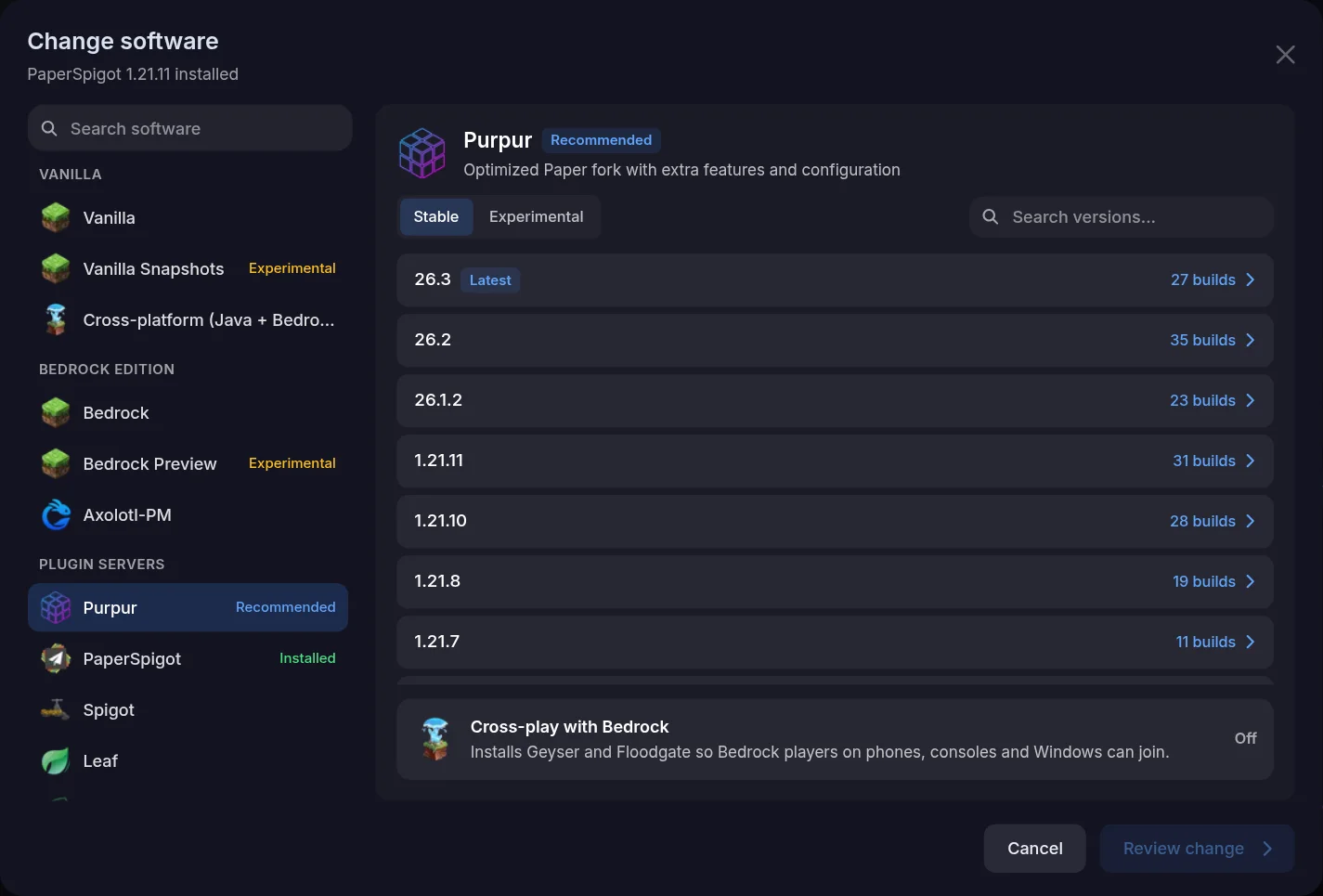
To see the software itself, press the button on the Console page that shows your software and version, then Change version or software…. The Change software window names what's installed under its title. Software in the Bedrock Edition group makes a Bedrock server, and so do PocketMine, Nukkit and CloudBurst under Discontinued. Everything else makes a Java server.
Java Edition runs on Windows, macOS and Linux. Bedrock Edition runs on phones, tablets, Xbox, PlayStation and Nintendo Switch, and on Windows as Minecraft for Windows. Your server's address covers what players on each edition type to join.
Mia's server needs a translator. Geyser speaks Bedrock to Bedrock players, and Floodgate lets them join without a Java account. The panel installs both from Change software, in one of two ways.
Both need Minecraft 1.16.5 or newer, and Geyser takes one of the ports your plan allows. Bedrock, Java, and crossplay has the steps.
After that, the Bedrock Edition tab of Connect has the address and port for Leo to type, an Add server to Minecraft button for the device you're on, and a link that adds the server for whoever opens it.
When that tab shows your server's name with port 19132, every server on the machine shares that port, and Falix tells them apart by name. Leo has to type mia.falixsrv.me with it, or the IP and port given under "Direct IP, if the address doesn't work".
Leo plays in Mia's Java world through a translation, and a few screens and blocks can look different on his phone. geysermc.org lists what doesn't translate.
A Bedrock-only server runs software from the Bedrock Edition group, and only Bedrock players can join it. Bedrock is the official server, Bedrock Preview previews upcoming features and may be unstable, and Axolotl-PM runs PocketMine plugins. PocketMine, Nukkit and CloudBurst are under Discontinued because players on Minecraft Bedrock 26.60 or newer can't join them.
Pick one when everyone in your group plays on Bedrock, because nothing has to be translated. For a mixed group like Mia and Leo, a Java server with cross-play is the usual answer, because Mia keeps her plugins and Leo can still join.
Besides My addons, the Addons page has tabs for Plugins, Mods, Modpacks, Datapacks and Resource packs, and Plugins, mods and datapacks explains which software runs which.
With cross-play on, Leo gets what Mia's plugins do without installing anything, but mods that players install in their own game don't reach him.
On Bedrock and Bedrock Preview, the Addons page installs add-ons, which are behavior packs and resource packs made for Bedrock. Java plugins, mods and datapacks don't run there. On Axolotl-PM, the page has a Plugins tab for PocketMine plugins.
Bedrock add-ons, behavior packs and resource packs shows how to install them.
| What you see | Why | What to do |
|---|---|---|
| Leo can't find the server from his phone | The Java server has no cross-play | Turn on Cross-play with Bedrock in Change software and install again |
| "Update Geyser so Bedrock players can keep joining" on the Console page | Minecraft Bedrock 26.60 and newer need a newer Geyser | Press Update Geyser, then restart. The panel shows you the new Bedrock port if there is one |