 Guides
Only show guides for your app
GuidesWhat each part of the Console page is, what the usual lines in a Minecraft log mean, which problems the panel explains for you, and where older logs are.
The console is the text your server prints while it runs, one line for each thing that happens. The Console page shows it live, with the buttons that start and stop the server above it and a command line and a status bar below.
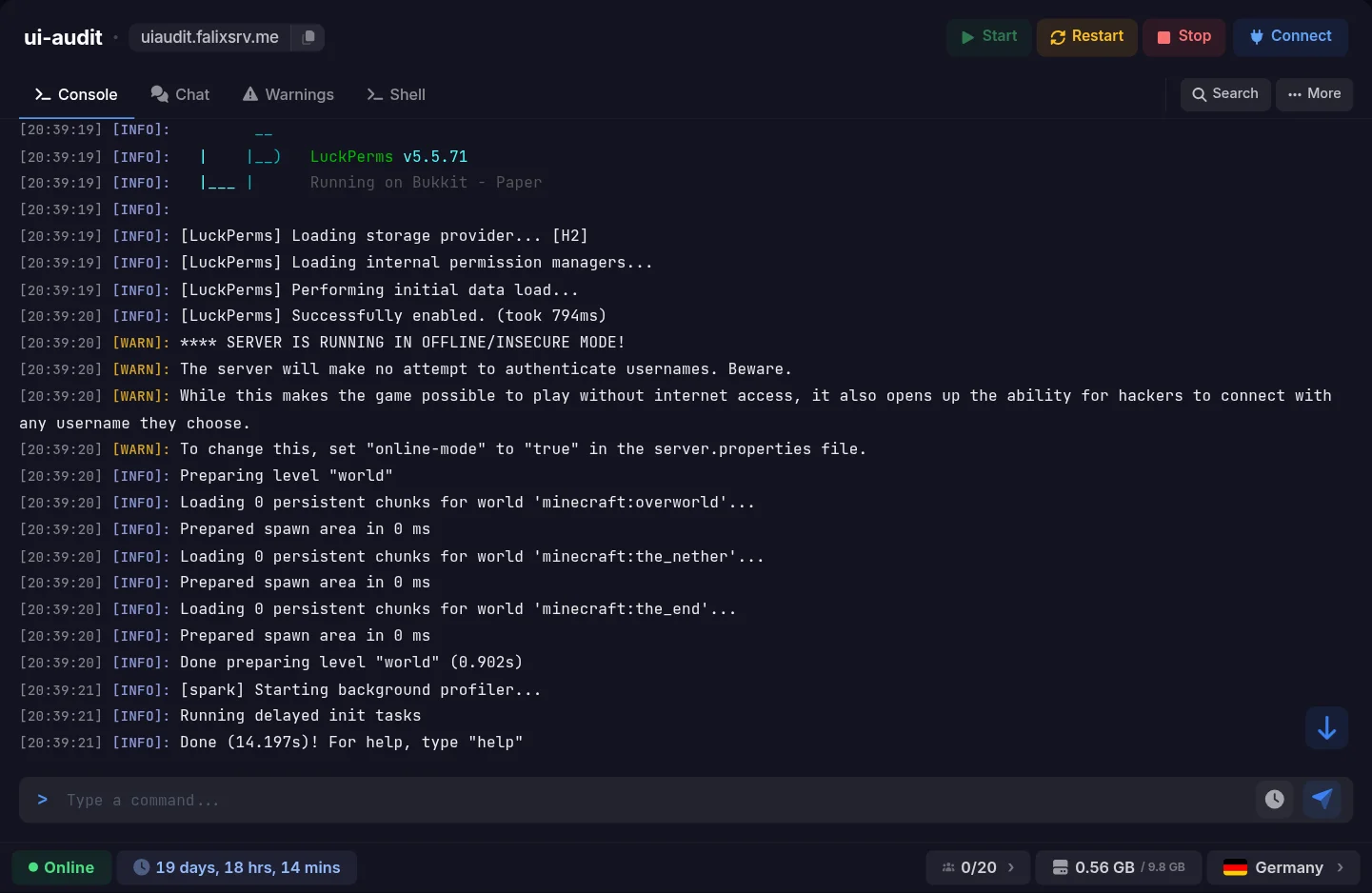
| Part | What it does |
|---|---|
| Name and address | Top left. Click the address to copy it |
| Start, Restart, Stop | Control the server. While it's stopping, Stop turns into Kill, which force stops a frozen server |
| Connect | Shows how players join. Your server's address explains it |
| Tabs | Console shows everything. On Minecraft, Chat, Errors and Warnings show only those lines, and the last two appear once the log has some. Shell opens a terminal on Premium |
| Search and More | Search finds text in the log. More has Share, which makes a public link to the log |
| Command line | Type a command and press Enter. On Minecraft you can leave out the slash. The clock button runs a command on a schedule |
| Status bar | The status (Online, Offline, Starting, Stopping, Sleeping or In storage) and the uptime, then the players online on Minecraft, the disk used and the location |
| CPU, Memory and Network cards | Live use, under the console. Your server's RAM, CPU and disk limits explains them |
The Console page goes through every button.
Mia runs a Paper server at mia.falixsrv.me. Every line in her console has the same three parts.
19:42:07TimeWhen it happenedINFOLevelHow serious the line isDone (8.941s)! For help, type "help"MessageWhat happened| Level | What it means | What to do |
|---|---|---|
INFO |
Normal activity, such as a player joining | Nothing |
WARN |
Something was off, and the server carried on | Look if it keeps repeating |
ERROR |
Something failed, such as a plugin that couldn't load | Read the message |
A Java error can print dozens of lines that start with at. The console folds them into one box, and the error's name and message at the top are the parts to read. If the server crashes, a "Server Crash Detected" box shows the exit code and links to the crash history.
An app server prints whatever your code prints, often with no level.
Done (8.941s)! For help, type "help" means a Minecraft Java server has loaded its world and players can join. The number is how long the start took. Falix watches for the same line, and it's what turns the status from Starting to Online.
If the line never comes, the server is still loading or it stopped on the way, and the last lines in the log say which.
The Console page reads the log as it arrives. When a line matches a problem it knows, it explains the problem and offers the fix.
| The log says | What it means | The panel offers |
|---|---|---|
You need to agree to the EULA |
Minecraft's licence, the EULA, isn't accepted yet | I agree, which accepts it and starts the server |
Unable to access jarfile |
No server version is installed | Install server version |
OutOfMemoryError or OOMKilled |
The server ran out of memory | Upgrade to Premium, or Increase resources on Premium |
requires running the server with Java 21 or above |
The server needs a newer Java | Change Java version |
Failed to verify username |
A player's account couldn't be checked | Details, and Enable offline mode, which lets anyone join under any name |
AccessDeniedException |
The server can't read or write a file | Open file manager, and a one-click fix for a world |
Could not load 'plugins/ShopPlus.jar' |
A plugin didn't load | Show me why |
Incompatible mods found |
A mod stopped the start | Show me why |
RCON running on |
RCON is on, which is insecure | Server properties |
Show me why opens a window that lists what it found and what to fix. If it can't find a known cause, Ask Felix reads the whole log.
On an app server, the page recognises a missing package, a missing file and a port that's already in use, and shows "Application issue detected" with a Details button.
Scroll up in the console and it loads earlier lines until it reaches "Beginning of logs".
For anything older, open the Logs page under Server settings, which opens the log files your server saved. A Minecraft Java server writes the current session to logs/latest.log, keeps earlier sessions beside it, and puts crash reports in crash-reports.
You can filter a file by Errors, Warnings, Info or Debug. Share makes a public link that expires after 7 days, with IP addresses, credentials and emails removed, and it's the link to send when you ask for help. Time Machine and Logs covers the page.